

How It Works
1
Train a LoRA
Train a LoRA locally against a FLUX.2 [klein] Base model using AI-Toolkit or Diffusers. The Dashboard upload dialog accepts
.safetensors checkpoints.2
Upload it to the Dashboard
In the Dashboard, go to Customization → Finetunes and click + Add Finetune. Pick the matching base model, give it a name (lowercase letters, digits, hyphens, and underscores only), optionally set a trigger phrase, and drop in the checkpoint. The name you pick is your
finetune_id.3
Call the fine-tuned endpoint
POST to the
{base_model}-finetuned endpoint with your finetune_id, then poll the returned polling_url until status is Ready.Available Endpoints
Each supported base model has a corresponding-finetuned endpoint. The request schema matches the underlying base endpoint, with two added parameters: finetune_id and finetune_strength.
The endpoint you call must match the base model and precision selected in the Dashboard. FP8 is the default precision. BF16 is currently available only for
flux-2-klein-9b-kv and maps to /v1/flux-2-klein-9b-kv-bf16-finetuned.finetune_id format
- Own LoRA: pass the name you chose in the Dashboard (e.g.
my-portrait-lora). - LoRA shared with your organization: prefix the owner’s organization ID —
{owner_org_id}/{lora_name}.
Quick Start
Replacemy-portrait-lora with the name of a finetune uploaded to your organization.
Request Parameters
The-finetuned endpoint accepts every parameter of its base endpoint, plus these two LoRA-specific fields:
For the rest of the request and response schema (prompt, dimensions,
input_image_*, seed, output format, polling response), see the base endpoint in the API Reference.
Behavior & Limits
- One LoRA per request. The API takes a single
finetune_id; stacking multiple LoRAs is not supported. - Base-model match is strict. Calling
flux-2-klein-4b-finetunedwith afinetune_iduploaded forflux-2-klein-9bwill fail — pick the endpoint that matches the finetune’s base model. - Rate limits and polling are identical to the base endpoint. See API Integration.
Tuning finetune_strength
finetune_strength scales the LoRA’s contribution at inference time.
- Start at
1.0— the default, and what the Dashboard’s copy-paste snippet uses. - If the LoRA overpowers the prompt (every output looks like your training set regardless of what you ask for), sweep
0.7 → 0.9with the sameseedto find the point where the style/subject is preserved without collapsing variety. - Lower values bias the generation back toward the base model.
- Always include the LoRA’s trigger phrase (if one was set during upload) in the prompt — strength alone won’t activate a phrase-gated LoRA.
Using Finetunes in the Playground
Finetunes are also available in the Playground. Open the model picker, expand Finetunes, and pick one of your uploaded finetunes — the Playground auto-routes to the matching-finetuned endpoint.
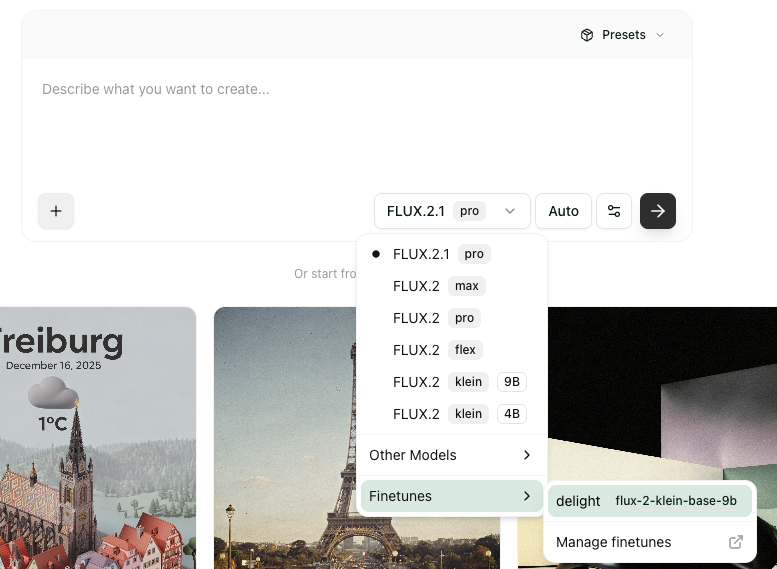
Finetunes submenu in the Playground model picker
Managing Finetunes in the Dashboard
LoRAs are managed under Customization → Finetunes in the Dashboard, where the feature is currently marked BETA. The list view shows columns for Name, Base Model, Source (Owned / Official / Third party), and Actions, with All / Owned / Shared filter tabs. Clicking a row expands an inline detail panel with an auto-generated API example and editable settings.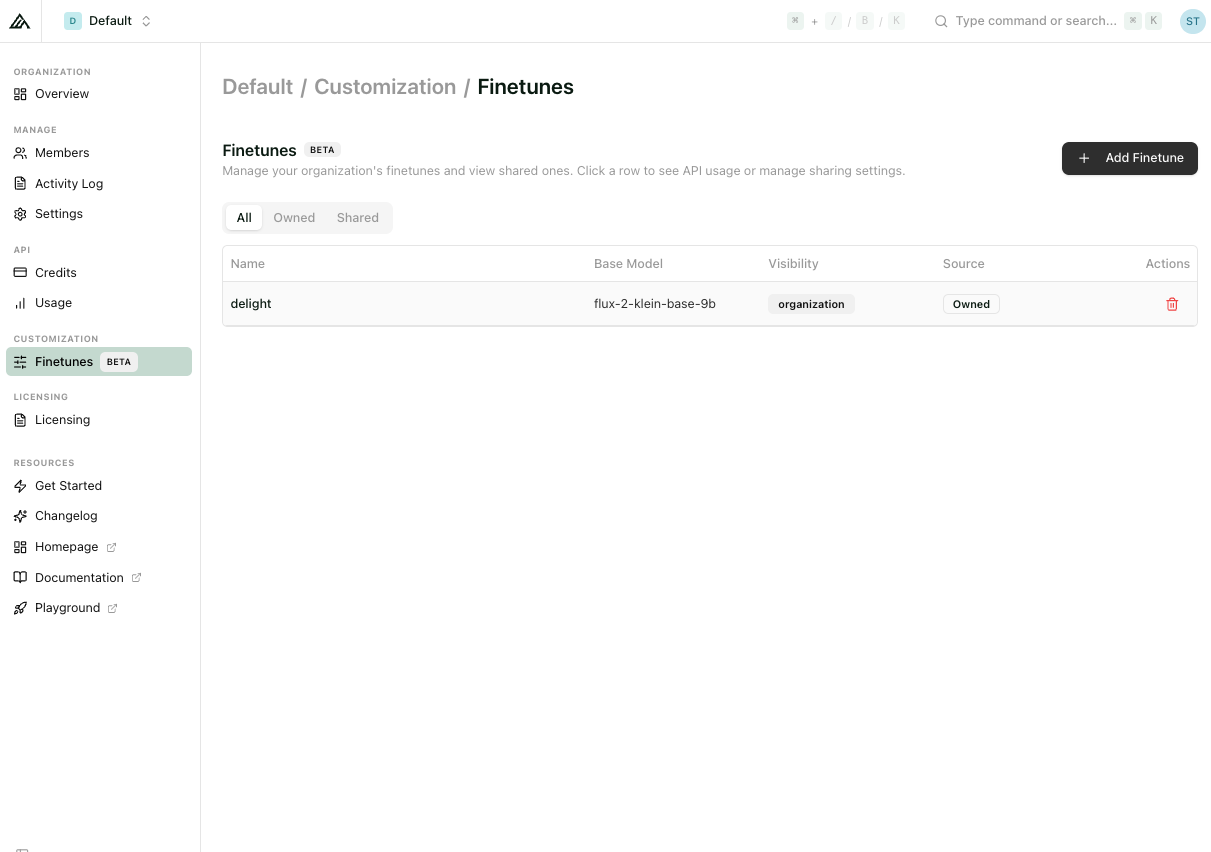
The Finetunes page under Customization in the Dashboard
Uploading a finetune
Click + Add Finetune in the top-right to open the upload dialog. Fields: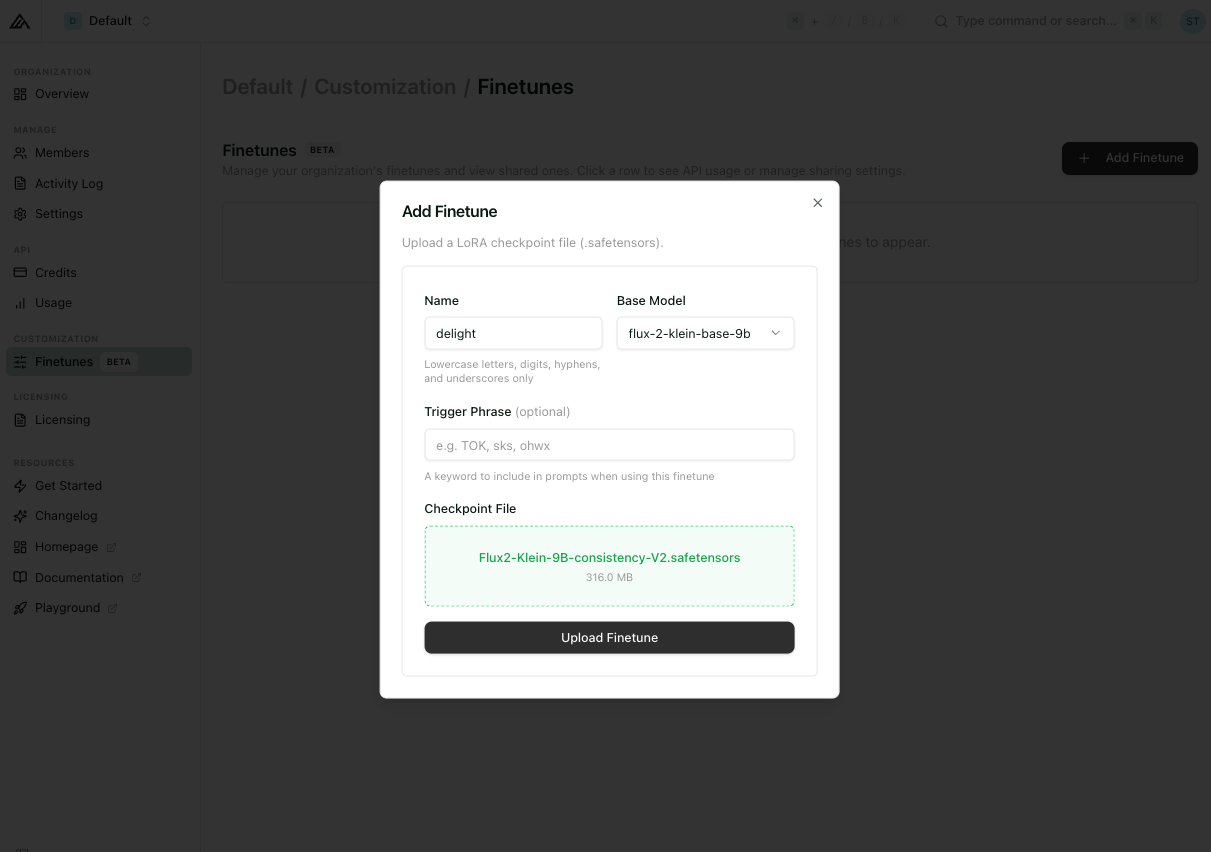
Add Finetune dialog
Submit with Upload Finetune.
Editing a finetune
Expanding a row reveals the detail panel, which contains: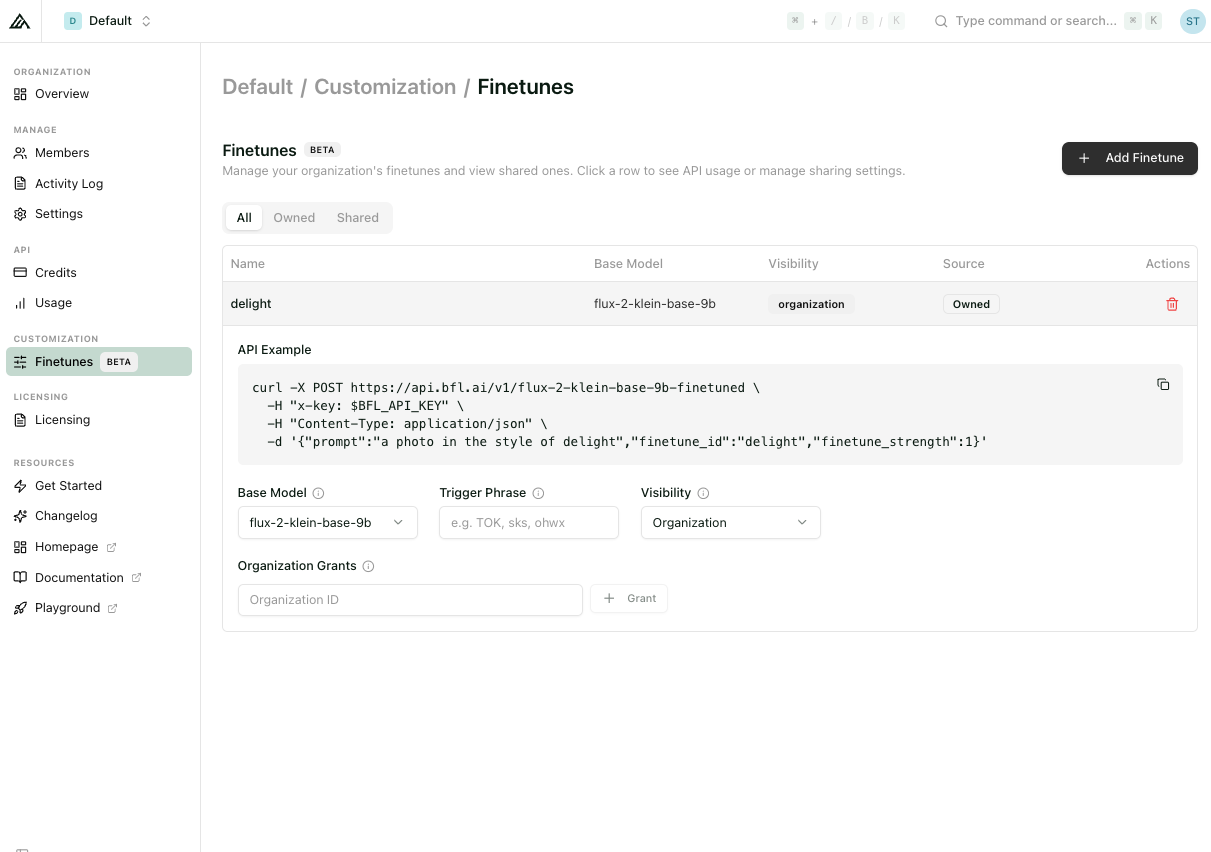
Finetune detail panel with API example and editable settings
- Base Model — dropdown, can be changed post-upload if needed.
- Precision — dropdown with
FP8andBF16. BF16 can currently be selected only forflux-2-klein-9b-kv. - Trigger Phrase — editable, clearable.
- Share with another Organization — input labelled Organization ID plus a + Grant button to share the finetune with another BFL organization.
- API Example — an auto-generated curl snippet that pre-fills
finetune_id,finetune_strength, and a prompt that uses the trigger phrase if one is set.
{owner_org_id}/{finetune_name}.
Organization sharing is targeted by organization ID. Granted finetunes appear under the recipient’s Shared tab.
Billing is always on the caller. Generations are billed to the API key that issues the request, regardless of who owns the finetune. Granting a finetune to another org does not expose the owner to inference costs incurred by callers.
Pricing
During public beta, LoRA endpoints are billed at the same rate as their base endpoint at the same resolution. See API Pricing for the current rates.Next Steps
Train a [klein] LoRA
Learn how to train a LoRA against a FLUX.2 [klein] Base model.
Training Example
Step-by-step walkthrough with a real dataset.
API Pricing
Current rates for fine-tuned endpoints.
API Reference
Full request and response schemas.