> ## Documentation Index
> Fetch the complete documentation index at: https://docs.bfl.ml/llms.txt
> Use this file to discover all available pages before exploring further.

# Building a Good Prompt

> Choose the subject, setting, lighting, and framing, then add details as you review results.

export const ImageExamples = ({examples = []}) => {
  const [copied, setCopied] = useState(null);
  const [expanded, setExpanded] = useState({});
  const [viewer, setViewer] = useState(null);
  const [actualSize, setActualSize] = useState(false);
  const openViewer = index => {
    setActualSize(false);
    setViewer(index);
  };
  const copyPrompt = async (prompt, index) => {
    try {
      await navigator.clipboard.writeText(prompt);
      setCopied(index);
      setTimeout(() => setCopied(null), 2000);
    } catch {
      setCopied(null);
    }
  };
  return <div className="not-prose flux3-image-examples" style={{
    "--example-columns": examples.length
  }}>
      <style>{`
        .flux3-image-examples {
          display: grid;
          grid-template-columns: repeat(var(--example-columns), minmax(0, 1fr));
          gap: 1rem;
          margin: 1.5rem 0;
        }
        .flux3-image-examples figure {
          display: flex;
          flex-direction: column;
          min-width: 0;
          margin: 0;
        }
        .flux3-image-examples .image-example-frame {
          display: flex;
          align-items: center;
          justify-content: center;
          aspect-ratio: 3 / 2;
          overflow: hidden;
          background: rgba(127, 127, 127, 0.08);
          border-radius: 0.75rem;
        }
        .flux3-image-examples .image-example-frame img {
          display: block;
          width: 100%;
          height: 100%;
          object-fit: contain;
          margin: 0;
          border-radius: 0;
        }
        .flux3-image-examples figcaption {
          margin-top: 0.75rem;
          font-size: 0.875rem;
        }
        .flux3-image-examples .image-example-prompt {
          display: flex;
          flex: 1;
          flex-direction: column;
          gap: 1rem;
          padding: 1.25rem;
          border-radius: 0.75rem;
          background: rgba(127, 127, 127, 0.08);
        }
        .flux3-image-examples .image-example-prompt p {
          margin: 0;
          line-height: 1.6;
        }
        .flux3-image-examples .image-example-prompt button {
          padding: 0.35rem 0.65rem;
          border-radius: 0.375rem;
          background: var(--aspen-evergreen, #486A58);
          color: white;
          font-size: 0.75rem;
          font-weight: 600;
          cursor: pointer;
        }
        .flux3-image-examples .image-example-frame button {
          display: block;
          width: 100%;
          height: 100%;
          padding: 0;
          border: 0;
          background: none;
          cursor: zoom-in;
        }
        .flux3-image-examples .image-example-prompt p.is-clamped {
          display: -webkit-box;
          -webkit-line-clamp: 4;
          -webkit-box-orient: vertical;
          overflow: hidden;
        }
        .flux3-image-examples .image-example-actions {
          display: flex;
          justify-content: flex-end;
          gap: 0.5rem;
          margin-top: auto;
        }
        .flux3-image-examples .image-example-actions .image-example-more {
          background: transparent;
          color: inherit;
          border: 1px solid rgba(128, 128, 128, 0.35);
        }
        .flux3-image-viewer {
          width: 100vw;
          height: 100vh;
          max-width: none;
          max-height: none;
          margin: 0;
          padding: 0;
          border: 0;
          overflow: auto;
          background: rgba(0, 0, 0, 0.95);
          cursor: zoom-out;
        }
        .flux3-image-viewer::backdrop {
          background: rgba(0, 0, 0, 0.6);
        }
        .flux3-image-viewer img {
          display: block;
          margin: auto;
          border-radius: 0;
        }
        .flux3-image-viewer.is-fit {
          display: flex;
          align-items: center;
          justify-content: center;
          padding: 2rem;
        }
        .flux3-image-viewer.is-fit img {
          max-width: 100%;
          max-height: 100%;
          object-fit: contain;
        }
        .flux3-image-viewer .flux3-image-viewer__bar {
          position: fixed;
          top: 1rem;
          right: 1rem;
          display: flex;
          gap: 0.5rem;
        }
        .flux3-image-viewer .flux3-image-viewer__bar button {
          padding: 0.35rem 0.75rem;
          border-radius: 0.375rem;
          background: rgba(255, 255, 255, 0.15);
          color: white;
          font-size: 0.8rem;
          font-weight: 600;
          cursor: pointer;
        }
        @media (max-width: 640px) {
          .flux3-image-examples { grid-template-columns: minmax(0, 1fr); }
        }
      `}</style>
      {examples.map(({src, alt, label, prompt, zoom, focus = "50% 50%"}, index) => <figure key={`${src}-${index}`}>
          <div className="image-example-frame">
            <button type="button" onClick={() => openViewer(index)} aria-label={`View full size: ${alt}`}>
              <img src={src} alt={alt} loading="lazy" style={zoom ? {
    transform: `scale(${zoom})`,
    transformOrigin: focus
  } : undefined} />
            </button>
          </div>
          {prompt ? <figcaption className="image-example-prompt">
              <p className={expanded[index] ? undefined : "is-clamped"}>{prompt}</p>
              <div className="image-example-actions">
                {prompt.length > 240 ? <button type="button" className="image-example-more" aria-expanded={!!expanded[index]} onClick={() => setExpanded({
    ...expanded,
    [index]: !expanded[index]
  })}>
                    {expanded[index] ? "Show less" : "Full prompt"}
                  </button> : null}
                <button type="button" onClick={() => copyPrompt(prompt, index)} aria-live="polite">
                  {copied === index ? "Copied!" : "Copy prompt"}
                </button>
              </div>
            </figcaption> : label ? <figcaption>{label}</figcaption> : null}
        </figure>)}
      {viewer !== null ? <dialog className={actualSize ? "flux3-image-viewer" : "flux3-image-viewer is-fit"} aria-label={examples[viewer].alt} ref={node => {
    if (node && !node.open) node.showModal();
  }} onClose={() => setViewer(null)} onClick={() => setViewer(null)}>
          <img src={examples[viewer].full || examples[viewer].src} alt={examples[viewer].alt} style={{
    cursor: actualSize ? "zoom-out" : "zoom-in"
  }} onClick={event => {
    event.stopPropagation();
    setActualSize(!actualSize);
  }} />
          <div className="flux3-image-viewer__bar" onClick={event => event.stopPropagation()}>
            <button type="button" onClick={() => setActualSize(!actualSize)}>
              {actualSize ? "Fit to screen" : "Actual size"}
            </button>
            <button type="button" onClick={() => setViewer(null)}>Close</button>
          </div>
        </dialog> : null}
    </div>;
};

export const PromptDisplay = ({prompt}) => {
  const [copied, setCopied] = useState(false);
  const copy = () => {
    navigator.clipboard.writeText(prompt);
    setCopied(true);
    setTimeout(() => setCopied(false), 2000);
  };
  return <div className="not-prose" style={{
    marginTop: "1rem"
  }}>
      <div style={{
    backgroundColor: "#1a1a1a",
    borderRadius: "1rem",
    padding: "1.25rem 1.5rem",
    display: "flex",
    flexDirection: "column",
    gap: "1rem"
  }}>
        <p style={{
    color: "#e5e5e5",
    fontSize: "1rem",
    lineHeight: 1.6,
    margin: 0,
    fontFamily: "inherit"
  }}>
          {prompt}
        </p>
        <div style={{
    display: "flex",
    justifyContent: "flex-end"
  }}>
          <button onClick={copy} style={{
    backgroundColor: copied ? "#3d8a5b" : "var(--aspen-evergreen, #486A58)",
    color: "#fff",
    border: "none",
    borderRadius: "0.375rem",
    padding: "0.25rem 0.6rem",
    fontSize: "0.7rem",
    fontWeight: 600,
    cursor: "pointer",
    transition: "background-color 0.2s"
  }}>
            {copied ? "Copied!" : "Copy prompt"}
          </button>
        </div>
      </div>
    </div>;
};

export const FLUX3_LAYOUT_BALLET = [{
  "key": "ballet",
  "title": "Swan Lake from the wings",
  "image": "https://cdn.sanity.io/images/2gpum2i6/production/73a5b9baeba9380b57849f07a73e1dff2fe45e19-1400x927.webp",
  "width": 1400,
  "height": 927,
  "aspect_ratio": "3:2",
  "caption": "Full-color indoor photograph with the grainy texture of mid-20th-century color film, captured at eye level from the dark wings of a theater stage. The foreground is heavily blurred due to a shallow depth of field, dominated on the left by the out-of-focus silhouettes of two observers <observer_1> <observer_2> standing in deep shadow. On the far right, the shadowed, out-of-focus profile of a young man <man_1> is partially visible, his gaze directed toward the center. Framed between these dark foreground elements is a brightly lit stage where three ballerinas <ballerina_1> <ballerina_2> <ballerina_3> perform. They are dressed in stark white classical tutus, contrasting sharply with the cool, muted color palette of deep purple and black shadows filling the cavernous space behind them. Small, glowing white orbs <orbs_1> are suspended in the air near the dancers' raised hands. A strong spotlight illuminates the center of the stage, casting long, soft shadows across the floor and highlighting the stiff tulle of the costumes. In the distant background, dark vertical curtains <curtains_1> are barely visible, while a single bright stage light <stage_light_1> shines through the gloom, creating a slight lens flare.",
  "rows": [{
    "id": "observer_1",
    "bbox": [100, 0, 1000, 200],
    "desc": "A completely blurred, dark silhouette of a person rendered as a soft mass of deep shadow, without identifiable features, garments, or text."
  }, {
    "id": "observer_2",
    "bbox": [350, 150, 1000, 350],
    "desc": "A second out-of-focus, shadowy silhouette of a figure appearing as a dark, unreadable shape."
  }, {
    "id": "man_1",
    "bbox": [200, 820, 950, 1000],
    "desc": "The heavily shadowed, out-of-focus profile of a young man's face. He has fair skin barely catching the ambient light and short dark hair, with his eyes fixed toward the left."
  }, {
    "id": "ballerina_1",
    "bbox": [300, 450, 900, 600],
    "desc": "A female ballet dancer in sharp focus, with pale skin and dark hair pulled tightly back into a bun beneath a white feathered headpiece. She wears a traditional classical tutu with a fitted white bodice and a stiff, tiered white tulle skirt. She stands en pointe on her right foot, her arms raised above her head in a curved fifth position."
  }, {
    "id": "ballerina_2",
    "bbox": [350, 300, 920, 480],
    "desc": "A ballet dancer in a matching stiff white tutu, white bodice, and feathered headpiece, captured mid-stride with her left leg extended forward. Her pale skin and crisp white costume are starkly highlighted by the stage spotlight."
  }, {
    "id": "ballerina_3",
    "bbox": [320, 600, 880, 750],
    "desc": "A third ballerina in identical classical white ballet attire and feathered headpiece, positioned with her body angled slightly away, her arms raised and her face turned in profile."
  }, {
    "id": "orbs_1",
    "bbox": [150, 300, 400, 750],
    "desc": "Several small, glowing white orb-like decorative lights suspended in mid-air near the raised hands of the dancers, casting a soft, localized white glow."
  }, {
    "id": "curtains_1",
    "bbox": [0, 0, 700, 1000],
    "desc": "Tall, dark vertical stage curtains and faint structural rigging receding into deep purple and black shadows, mostly obscured by darkness."
  }, {
    "id": "stage_light_1",
    "bbox": [50, 650, 150, 750],
    "desc": "A single, bright, circular stage illumination fixture emitting a cool white beam that creates a faint optical lens flare."
  }]
}];

export const LayoutExplorer = ({examples = [], mediaBase = "", initial = 0}) => {
  const COLORS = ["#e8b04a", "#6fb3d9", "#e0708a", "#8fcf7a", "#b99af0", "#f08b5b", "#5fd0c0", "#d9d36f", "#9fb0c8", "#f2a3c7", "#7aa0f0", "#c7e07a"];
  const [index, setIndex] = useState(initial);
  const [active, setActive] = useState(null);
  const [showBoxes, setShowBoxes] = useState(true);
  const [cursor, setCursor] = useState(null);
  const [copied, setCopied] = useState(false);
  const [expanded, setExpanded] = useState(false);
  const stage = useRef(null);
  const [loaded, setLoaded] = useState({});
  const [failedSource, setFailedSource] = useState("");
  const ex = examples[index];
  if (!ex) return null;
  const source = mediaBase + ex.image;
  const ready = Boolean(loaded[source]);
  const reveal = async (image, key) => {
    try {
      await image.decode();
      setLoaded(current => ({
        ...current,
        [key]: true
      }));
    } catch {
      setFailedSource(key);
    }
  };
  const preload = example => {
    const image = new Image();
    image.src = mediaBase + example.image;
  };
  const hidden = new Set(ex.hidden || []);
  const color = id => COLORS[ex.rows.findIndex(r => r.id === id) % COLORS.length];
  const pct = ([y0, x0, y1, x1]) => ({
    top: y0 / 10 + "%",
    left: x0 / 10 + "%",
    height: (y1 - y0) / 10 + "%",
    width: (x1 - x0) / 10 + "%"
  });
  const prompt = ex.caption + " " + JSON.stringify(ex.rows.map(({id, bbox, desc}) => ({
    id,
    bbox,
    desc
  })));
  const pick = i => {
    setCopied(false);
    setIndex(i);
    setActive(null);
    setExpanded(false);
  };
  const copy = async () => {
    try {
      await navigator.clipboard.writeText(JSON.stringify({
        prompt,
        aspect_ratio: ex.aspect_ratio
      }, null, 2));
      setCopied(true);
      setTimeout(() => setCopied(false), 1800);
    } catch (e) {
      setCopied(false);
    }
  };
  const onMove = e => {
    const r = stage.current.getBoundingClientRect();
    const k = v => Math.max(0, Math.min(1000, Math.round(v * 1000)));
    setCursor([k((e.clientY - r.top) / r.height), k((e.clientX - r.left) / r.width)]);
  };
  const parts = ex.caption.split(/(<[A-Za-z0-9_]+>)/g).filter(Boolean);
  const rows = expanded ? ex.rows : ex.rows.slice(0, 6);
  const hot = id => ({
    onMouseEnter: () => setActive(id),
    onMouseLeave: () => setActive(null),
    onFocus: () => setActive(id),
    onBlur: () => setActive(null)
  });
  return <section className="not-prose layout-explorer" aria-label="Layout prompt explorer">
      <style>{`
.layout-explorer{container-type:inline-size;margin:1.5rem 0 2rem;border:1px solid rgba(128,128,128,.25);border-radius:1rem;overflow:hidden;background:rgba(127,127,127,.04)}
.layout-explorer .lx-picker{display:flex;align-items:center;font-size:.85rem;gap:.4rem;flex-wrap:wrap;padding:.85rem;border-bottom:1px solid rgba(128,128,128,.2)}
.layout-explorer .lx-pills{display:flex;flex-wrap:wrap;gap:.4rem}
.layout-explorer .lx-pills button{font:inherit;font-size:.8rem;padding:.3rem .75rem;border:1px solid rgba(128,128,128,.35);border-radius:999px;background:transparent;color:inherit;cursor:pointer}
.layout-explorer .lx-pills button:hover{border-color:var(--aspen-evergreen,#486a58)}
.layout-explorer .lx-pills button[aria-pressed="true"]{background:var(--aspen-evergreen,#486a58);border-color:var(--aspen-evergreen,#486a58);color:#fff}
.layout-explorer .lx-body{display:grid;grid-template-columns:minmax(0,1.05fr) minmax(0,1fr);gap:1.25rem;padding:1.1rem}
.layout-explorer .lx-stage{position:relative;overflow:hidden;border-radius:.6rem;background:#111;cursor:crosshair;align-self:start}
.layout-explorer .lx-visual{opacity:0;transition:opacity .18s ease}
.layout-explorer .lx-visual.is-ready{opacity:1}
.layout-explorer .lx-loading{position:absolute;inset:0;display:grid;place-items:center;color:#ccc;font-size:.8rem;padding:1rem;text-align:center}
.layout-explorer .lx-stage img{display:block;width:100%;height:auto;margin:0}
.layout-explorer .lx-box{position:absolute;border:2px solid var(--c);border-radius:3px;background:transparent;transition:background .15s,opacity .2s,border-width .15s;pointer-events:none}
.layout-explorer .lx-box span{position:absolute;left:-2px;top:-2px;transform:translateY(-100%);background:var(--c);color:#141414;font:600 10px/1.4 ui-monospace,SFMono-Regular,Menlo,monospace;padding:1px 5px;border-radius:3px 3px 0 0;white-space:nowrap;max-width:14rem;overflow:hidden;text-overflow:ellipsis}
.layout-explorer .lx-box.is-inside span{transform:none;border-radius:0 0 3px 0}
.layout-explorer .lx-box.is-dim{opacity:.18}
.layout-explorer .lx-box.is-hot{border-width:3px;background:color-mix(in srgb,var(--c) 22%,transparent);opacity:1;z-index:2}
.layout-explorer .lx-readout{position:absolute;right:.5rem;bottom:.5rem;font:500 11px ui-monospace,SFMono-Regular,Menlo,monospace;background:rgba(0,0,0,.72);color:#f2f2f2;padding:.25rem .5rem;border-radius:.35rem;pointer-events:none}
.layout-explorer .lx-tools{display:flex;gap:.5rem;align-items:center;justify-content:space-between;margin-top:.6rem;font-size:.8rem;opacity:.85}
.layout-explorer .lx-tools label{display:flex;gap:.4rem;align-items:center;cursor:pointer}
.layout-explorer summary{font-size:.85rem;cursor:pointer;padding:.3rem 0}
.layout-explorer details[open] summary{margin-bottom:.4rem}
.layout-explorer .lx-side{display:flex;flex-direction:column;gap:.9rem;min-width:0}
.layout-explorer .lx-h{font:600 .7rem/1 system-ui,sans-serif;letter-spacing:.08em;text-transform:uppercase;opacity:.6;margin:0 0 .4rem}
.layout-explorer .lx-caption{font-size:.88rem;line-height:1.65;margin:0}
.layout-explorer .lx-token{display:inline;font:600 .75rem ui-monospace,SFMono-Regular,Menlo,monospace;padding:.05rem .35rem;margin:0 .1rem;border-radius:.3rem;border:1px solid var(--c);background:color-mix(in srgb,var(--c) 14%,transparent);color:inherit;cursor:default}
.layout-explorer .lx-token.is-hot{background:var(--c);color:#141414}
.layout-explorer .lx-rows{display:flex;flex-direction:column;gap:.35rem;margin:0;padding:0;list-style:none}
.layout-explorer .lx-row{display:grid;grid-template-columns:minmax(0,1fr) auto;gap:.2rem .6rem;padding:.45rem .6rem;border-radius:.5rem;border:1px solid transparent;background:rgba(127,127,127,.07);outline:none}
.layout-explorer .lx-row.is-hot,.layout-explorer .lx-row:focus-visible{border-color:var(--c)}
.layout-explorer .lx-row code{font-size:.72rem;background:none;padding:0}
.layout-explorer .lx-row .lx-id{display:flex;align-items:center;gap:.35rem;font-weight:600}
.layout-explorer .lx-row .lx-id i{width:.6rem;height:.6rem;border-radius:2px;background:var(--c);display:inline-block}
.layout-explorer .lx-row .lx-bbox{justify-self:end;opacity:.7}
.layout-explorer .lx-row .lx-desc{grid-column:1/-1;margin:0;font-size:.78rem;line-height:1.45;opacity:.8;display:-webkit-box;-webkit-line-clamp:2;-webkit-box-orient:vertical;overflow:hidden}
.layout-explorer .lx-row.is-hot .lx-desc{-webkit-line-clamp:unset}
.layout-explorer .lx-more,.layout-explorer .lx-copy{align-self:flex-start;font-size:.78rem;font-weight:600;padding:.45rem .8rem;border-radius:.45rem;cursor:pointer}
.layout-explorer .lx-more{background:transparent;border:1px solid rgba(128,128,128,.35);color:inherit}
.layout-explorer .lx-copy{background:var(--aspen-evergreen,#486a58);border:1px solid var(--aspen-evergreen,#486a58);color:#fff}
.layout-explorer .lx-idea p:last-child{margin:.25rem 0 0;font-size:.9rem;line-height:1.5}
.layout-explorer .lx-actions{display:flex;gap:.5rem;flex-wrap:wrap}
@container (max-width:760px){.layout-explorer .lx-body{grid-template-columns:minmax(0,1fr)}}
@media (prefers-reduced-motion:reduce){.layout-explorer *{transition:none!important}}
      `}</style>

      {examples.length > 1 ? <div className="lx-picker">
        <div className="lx-pills" role="group" aria-label="Example" onFocus={() => examples.forEach(preload)} onMouseEnter={() => examples.forEach(preload)}>
          {examples.map((example, i) => <button key={example.key} type="button" aria-pressed={i === index} onClick={() => pick(i)}>{example.title}</button>)}
        </div>
      </div> : null}

      <div className="lx-body">
        <div>
          <div className="lx-stage" style={{
    aspectRatio: `${ex.width} / ${ex.height}`
  }} aria-busy={!ready} ref={stage} onPointerMove={onMove} onPointerLeave={() => setCursor(null)}>
            {!ready && <div className="lx-loading" role="status">{failedSource === source ? "Image unavailable. Choose another example or reload to retry." : "Loading example…"}</div>}
            <div className={ready ? "lx-visual is-ready" : "lx-visual"} aria-hidden={!ready}>
            <img key={source} src={source} onLoad={event => reveal(event.currentTarget, source)} onError={() => setFailedSource(source)} alt={ex.title + ", generated with FLUX 3 from the layout shown alongside"} width={ex.width} height={ex.height} />
            {showBoxes && ex.rows.map(r => {
    if (hidden.has(r.id) && active !== r.id) return null;
    const cls = ["lx-box"];
    if (r.bbox[0] < 40) cls.push("is-inside");
    if (active && active !== r.id) cls.push("is-dim");
    if (active === r.id) cls.push("is-hot");
    return <div key={r.id} className={cls.join(" ")} style={{
      ...pct(r.bbox),
      "--c": color(r.id)
    }}>
                  <span>{r.id}</span>
                </div>;
  })}
            </div>
            {ready && cursor && <div className="lx-readout">y {cursor[0]} · x {cursor[1]}</div>}
          </div>
          <div className="lx-tools">
            <label>
              <input type="checkbox" checked={showBoxes} onChange={e => setShowBoxes(e.target.checked)} />
              Show boxes
            </label>
            <span>{ex.rows.length} boxes · {ex.aspect_ratio}</span>
          </div>
        </div>

        <div className="lx-side">
          {ex.idea && <div className="lx-idea">
              <p className="lx-h">Short prompt</p>
              <p>{ex.idea}</p>
            </div>}
          <details>
            <summary>Full prompt</summary>
            <p className="lx-caption">
              {parts.map((part, i) => {
    const m = part.match(/^<([A-Za-z0-9_]+)>$/);
    if (!m) return <span key={i}>{part}</span>;
    const id = m[1];
    return <span key={i} tabIndex={0} className={active === id ? "lx-token is-hot" : "lx-token"} style={{
      "--c": color(id)
    }} {...hot(id)}>
                    {"<" + id + ">"}
                  </span>;
  })}
            </p>
          </details>
          <div>
            <p className="lx-h">Elements</p>
            <ul className="lx-rows">
              {rows.map(r => <li key={r.id} tabIndex={0} className={active === r.id ? "lx-row is-hot" : "lx-row"} style={{
    "--c": color(r.id)
  }} {...hot(r.id)}>
                  <code className="lx-id"><i aria-hidden="true" />{r.id}</code>
                  <code className="lx-bbox">[{r.bbox.join(", ")}]</code>
                  <div className="lx-desc">{r.desc}</div>
                </li>)}
            </ul>
          </div>
          <div className="lx-actions">
            {ex.rows.length > 6 && <button type="button" className="lx-more" onClick={() => setExpanded(!expanded)}>
                {expanded ? "Show fewer rows" : "Show all " + ex.rows.length + " rows"}
              </button>}
            <button type="button" className="lx-copy" onClick={copy} aria-live="polite">
              {copied ? "Copied" : "Copy request body"}
            </button>
          </div>
        </div>
      </div>
    </section>;
};

Write a description of the finished image. Name the subject, setting, light, and framing, then add details that matter to your use case.

## Prompt length

Start with a sentence and add detail as you review results. A longer prompt
is useful for several subjects, a specific layout, or text in the image.
Add details that describe the result you want; omit quality tags such as
"masterpiece".

## Structure helps

A clear structure matters more than length.

A good prompt works like a set of instructions. It tells the model what kind of image this is, what the main subject is, where the scene happens, and how it is lit and framed. This order is a useful starting point:

1. **Image type and medium**: one opening sentence that sets the look. `High-angle black and white photograph with a grainy film texture`
2. **Subject**: who or what, and what they are doing. `Two red pandas resting on bamboo beams, one looking relaxed and the other asleep`
3. **Setting**: where it happens and what surrounds the subject. `a fog-drenched coastal highway, cliffs on one side, turquoise sea on the other`
4. **Light**: the source, direction, quality, and color. `soft golden rim light`
5. **Framing and detail**: shot size, angle, lens, depth of field, and the small details that make it specific. `ultra-wide shot`, `shallow depth of field`

The order is a habit, not a rule: put first whatever matters most. The coastal road prompt below opens with the shot type because the ultra-wide frame is the point of the image. The [worked example](#from-idea-to-detailed-caption) shows the full order in a launch caption.

<ImageExamples
  examples={[
{
src: "https://cdn.sanity.io/images/2gpum2i6/production/29a4ca87e605029fa9b98a14fa8c07f53a0c2ef2-1800x773.webp",
alt: "FLUX 3 Image: a vintage car with its headlights on, driving a coastal road between fog-covered cliffs and a turquoise sea at dawn.",
prompt: "Ultra-wide cinematic shot of a fog-drenched coastal highway at dawn, cliffs on one side, turquoise sea on the other, a single vintage car with headlights on, soft golden rim light"
},
{
src: "https://cdn.sanity.io/images/2gpum2i6/production/eef1a577855ea42fef99bf437c725c8323d0f1c8-1800x1013.webp",
alt: "FLUX 3 Image: two red pandas resting on bamboo beams among green leaves, one alert and one asleep.",
prompt: "Two red pandas resting on bamboo beams, one looking relaxed and the other asleep. Their reddish-brown fur and white facial markings stand out against the soft, blurred natural background, suggesting a peaceful, sunny environment."
}
]}
/>

Both are FLUX 3 Image outputs from the prompts shown. Here is the job each phrase does:

| Job | Coastal road (21:9) | Red pandas (16:9) |
| - | - | - |
| Subject | “a single vintage car with headlights on” | “Two red pandas resting on bamboo beams, one looking relaxed and the other asleep” |
| Setting | “a fog-drenched coastal highway at dawn, cliffs on one side, turquoise sea on the other” | “soft, blurred natural background” |
| Light | “soft golden rim light” | “a peaceful, sunny environment” |
| Framing | “Ultra-wide cinematic shot” | Not stated. The blurred background implies a shallow depth of field |
| Style | “cinematic” | Not stated. The result is a photograph |

The red panda prompt also spends a sentence on appearance ("reddish-brown fur and white facial markings") and on a relationship between the two subjects ("one looking relaxed and the other asleep"). Describe relationships directly when they matter.

## From idea to detailed caption

This image started as a 16-word idea:

```text wrap theme={null}
Three ballerinas dancing Swan Lake, seen from the wings past the dark silhouettes of people watching.
```

FLUX 3 Image received the 186-word caption below, plus a bounding box for each
element. Hover over the caption to see where each box goes:

<LayoutExplorer examples={FLUX3_LAYOUT_BALLET} />

Every sentence in the caption does a job you can name:

| Job | Words in the caption |
| - | - |
| Image type and style | “Full-color indoor photograph with the grainy texture of mid-20th-century color film” |
| Framing | “captured at eye level from the dark wings of a theater stage”; “heavily blurred due to a shallow depth of field” |
| Subject | “three ballerinas … perform. They are dressed in stark white classical tutus” |
| Setting | “a brightly lit stage”; “two observers … standing in deep shadow”; “dark vertical curtains” |
| Light | “A strong spotlight illuminates the center of the stage, casting long, soft shadows across the floor and highlighting the stiff tulle of the costumes” |
| Colors | “the cool, muted color palette of deep purple and black shadows” |
| Additional elements | “Small, glowing white orbs … are suspended in the air near the dancers’ raised hands” |
| Effect | “a single bright stage light … shines through the gloom, creating a slight lens flare” |

The expanded caption specifies choices the short idea leaves open: foreground
silhouettes, a central spotlight, and mid-century film grain. It also describes
visible details instead of relying on the name "Swan Lake".

## Add specific details

Start with the core subject: `a cat`, `a family on a beach`, `autumn foliage in a park`. Then add the details that make the image yours:

* **What the subject is doing**: `looking up`, `playing`, `running`
* **How the action feels**: `joyfully`, `fearfully`, `boldly`
* **The mood of the image**: `ominous morning rain`, `dangerous sunset mountains`, `nostalgic coffee table`

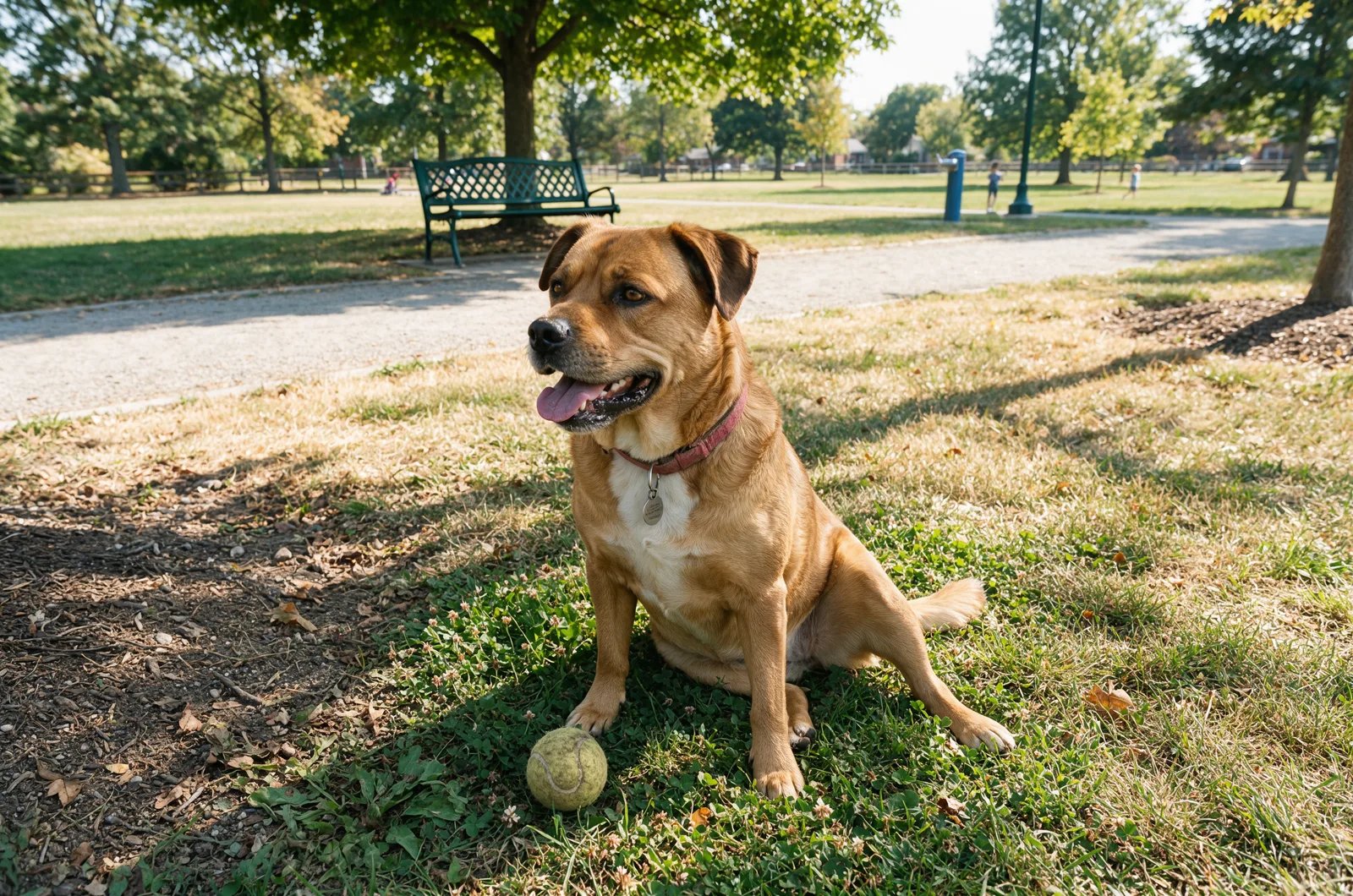
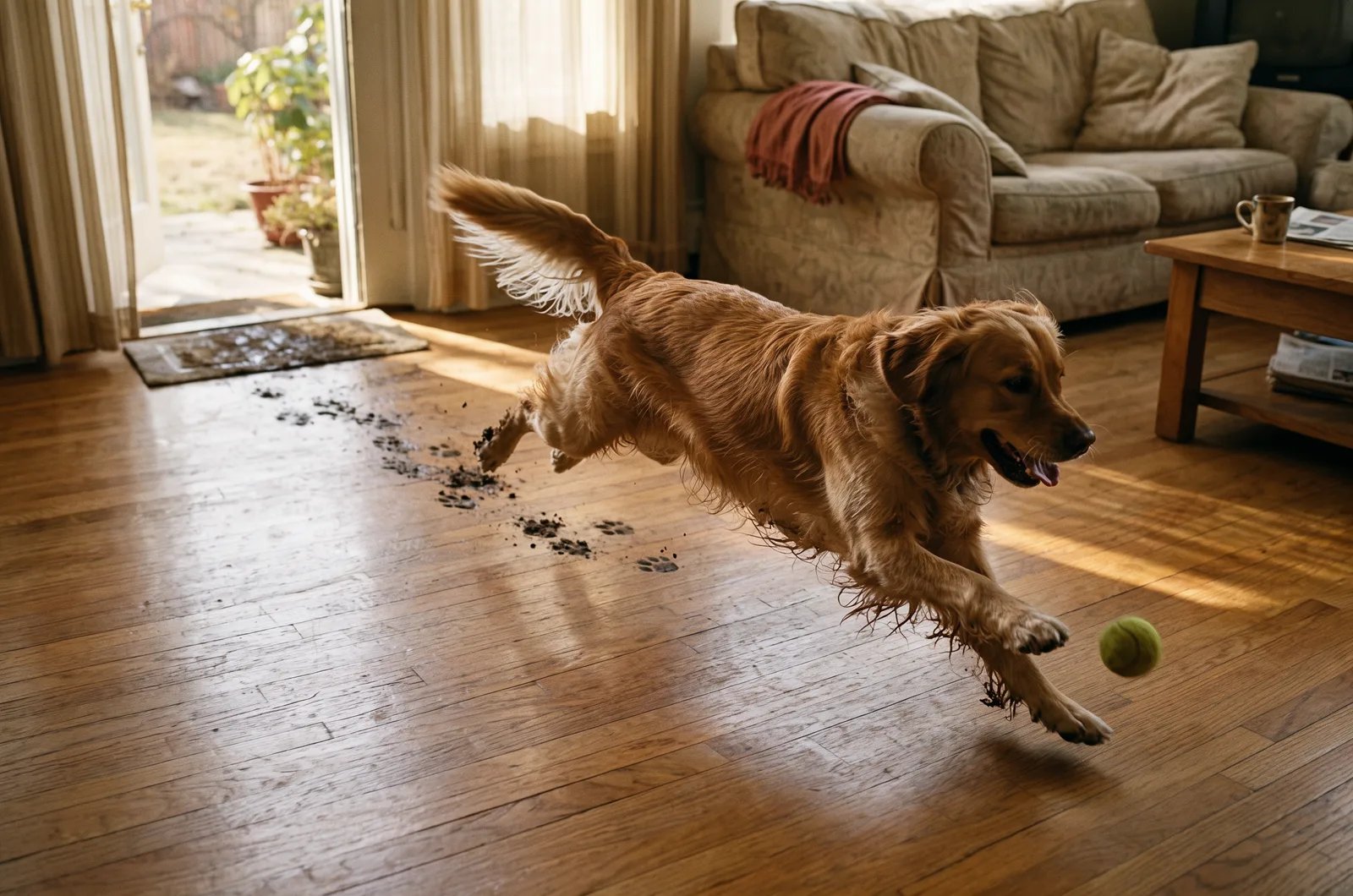
Compare a simple prompt with a directed one. Both were generated with FLUX 3 Image.

<Columns cols={2}>
  <div>
    <img src="https://mintcdn.com/bfl/2M9j52sP07XkdzRL/images/flux3-image/regen/F2-09.webp?fit=max&auto=format&n=2M9j52sP07XkdzRL&q=85&s=8c55d0628dfcc4a728a31c6204333b2f" alt="Simple prompt: a dog sitting in a sunny park" width="1600" height="1060" data-path="images/flux3-image/regen/F2-09.webp" />

    <PromptDisplay prompt="A dog sitting in a sunny park" />
  </div>

  <div>
    <img src="https://mintcdn.com/bfl/2M9j52sP07XkdzRL/images/flux3-image/regen/F2-10.webp?fit=max&auto=format&n=2M9j52sP07XkdzRL&q=85&s=4d1f0cc493a072f6de3c5fd99c28f198" alt="Directed prompt: a golden retriever leaps after a tennis ball, with muddy paw prints leading back to the open door" width="1600" height="1060" data-path="images/flux3-image/regen/F2-10.webp" />

    <PromptDisplay prompt="A golden retriever mid-leap chasing a tennis ball across a sunlit hardwood floor in a cozy living room, a trail of muddy paw prints on the floor behind it, leading back toward the open doorway, warm afternoon light streaming through sheer curtains, shallow depth of field, candid pet photography, 35mm lens" />
  </div>
</Columns>

<Warning>
  Describe visible details that distinguish your subject.
</Warning>

## The prompt components

| Component | What it controls | Example |
| - | - | - |
| **Image type** | The overall category or framing of the image | `portrait`, `landscape`, `macro` |
| **Subject** | The main thing you want to see | `a young woman with curly red hair` |
| **Location** | The setting or environment | `in a futuristic space station` |
| **Style** | The artistic or visual direction | `editorial photography`, `anime illustration` |
| **Camera settings** | Lens, framing, depth of field, shot style | `85mm lens, shallow depth of field` |
| **Lighting** | How the image is lit | `soft window light`, `golden hour sunlight` |
| **Colors** | The dominant palette | `muted earth tones`, `deep green and cream` |
| **Effect** | Extra visual treatment | `motion blur`, `film grain`, `soft bloom` |
| **Additional elements** | Supporting details that enrich the scene | `wind-blown fabric, falling leaves` |

## Image type

The **image type** tells the model what kind of image to create. Even before you describe the subject, it affects composition and visual expectations.

Useful starting points:

* **Portrait**: close-up or medium shot focused on a person or character
* **Landscape**: wide scene showing nature, architecture, or an environment
* **Bird's-eye view**: top-down perspective, as if seen from high above
* **Macro**: extreme close-up showing fine details
* **Abstract**: shape, color, or texture-driven composition

The layout captions shown here open with the image type and medium in one sentence: "Full-color candid street photograph taken from a steep worm's-eye view", "Minimalist graphic illustration", "Digital graphic design mockup shot straight-on".

If you are learning how prompt parts change the result, start with a simple image type such as `portrait`. It makes the effect of later additions easier to see.

## Subject

The **subject** is the main focus of the image. Be specific when it matters: clear subjects render more consistently than vague ones.

* `a young woman with curly red hair`
* `an elderly man with a long white beard`
* `a cyberpunk teenager with neon blue hair`
* `a Siamese cat with a blue collar`
* `a single red rose`

With FLUX 3, you can describe several subjects and how they relate in full sentences: who faces whom, who is in focus, who is asleep.

## Location

The **location** sets the scene. It provides context and changes the mood of the image even when the subject stays the same.

* `in a bustling city street`
* `on a serene beach at sunset`
* `in a futuristic space station`
* `inside a dimly lit jazz club`
* `in a dense forest after rain`

Changing only the location is one of the fastest ways to explore variations on the same concept.

## Style

The **style** sets the visual language. This can be photographic, illustrative, cinematic, painterly, or specific to a medium.

* `fashion editorial photography`
* `wildlife documentary style`
* `anime illustration`
* `oil painting`
* `minimalist product photography`

If style is central to the result, mention it early and keep it concrete. "The grainy texture of mid-20th-century color film" tells the model more than "vintage". [Style, Aesthetics & Text](/guides/prompting_unified_style) covers photographic looks, art styles, and lighting in depth.

### Art form and style

If you want a specific visual effect, describe both the **art form** and the **style**.

#### Photography

Photography is useful when you want realistic images. You can control framing, lighting conditions, lens feel, camera distance, and depth of field.

`A child playing on a sunny beach, building a sandcastle, action photography, high shutter speed, soft warm light`

#### Painting

Painting prompts work well when you want texture, brushwork, and stronger artistic interpretation. You can combine:

* techniques such as `oil painting` or `watercolor`
* movements such as `impressionism` or `fauvism`
* artist references when appropriate

`Impressionist oil painting of a small robot in a garden`

#### Illustration

Illustration is useful when you want a drawn or stylized result rather than a photo-like one: `pencil drawing`, `charcoal sketch`, `cartoon illustration`, `poster illustration`.

`Illustration of dinosaurs drawn in a childlike style, cute and playful`

#### Digital art

Digital art is useful when you want a more synthetic, graphic, or contemporary visual language.

`An isolated convenience store in the desert at sunset, lo-fi digital art, nostalgic atmosphere`

#### Film still

Film still is useful when you want something cinematic and emotionally charged.

`Buildings on fire, old film still, smoky atmosphere, dramatic contrast`

#### Other art forms

You can also experiment with `sculpture`, `collage`, `street art`, `textile art`, `installation art`, `ceramic art`, and `lithography`. Mixing art forms and styles can lead to strong results, but keep the combination coherent.

## Camera settings

The **camera settings** define how the image is framed or captured. They matter most when you want a photographic result.

* `85mm lens`
* `wide-angle shot`
* `close-up framing`
* `shallow depth of field`
* `shot from a low angle`

Use these when framing matters. If the exact camera look is not important, you can skip this part.

### Framing

Framing controls how the subject is positioned in the image. Useful framing language:

* `close-up`
* `medium shot`
* `wide shot`
* `overhead view`
* `point-of-view shot`
* `dutch angle`
* `low-angle shot`

If a result keeps pulling back further than you want, make the subject and its framing clear first and move environmental details later.

This version can lead to a wider scene than intended:

`Person standing inside a forest fire, strong determined attitude, close-up shot, realistic`

This rewrite usually gives you more control:

`Person with a strong determined expression, forest fire in the background, close-up shot, realistic`

With FLUX 3, you can also say where things sit in plain words ("on the far right", "in the lower-left foreground"). To specify positions, add [bounding boxes](/flux_3/flux3_image_layout).

## Lighting

Lighting shapes contrast, mood, depth, and realism. Name the source and say what the light does:

* `soft window light`
* `golden hour sunlight`
* `harsh direct flash`
* `overcast daylight`
* `neon backlighting`
* `a small candle that provides a warm orange point of light`
* `a Japanese pine tree illuminated by a cool, artificial green light`

The last two are adapted from a FLUX 3 launch caption. Shorter terms work as well: `soft light`, `hard light`, `dramatic lighting`, `morning light`, `sunset light`, `golden hour`. See [Lighting](/guides/prompting_unified_style#lighting) for portrait and cinematic setups.

## Colors

Colors define the palette and keep the image visually coherent.

* `muted beige and forest green tones`
* `deep blue and silver`
* `warm orange and pink sunset colors`
* `monochrome black and white`
* `desaturated pastel palette`

### Color scheme

A color scheme is useful when you want the entire image to feel unified.

`A futuristic busy city, purple and green color scheme`

Lighting already influences color, but explicit palette direction keeps it consistent. Some FLUX 3 launch captions close with a palette sentence, for example "The scene's color palette sharply contrasts the deep cool blues of twilight with the warm, incandescent oranges and yellows of the city lights." In an edit, you can specify a target color with a hex code: see [Exact colors with hex codes](/guides/prompting_unified_style#exact-colors-with-hex-codes).

## Effect

Effect adds visual treatment on top of the base scene.

* `film grain`
* `soft bloom`
* `motion blur`
* `bokeh`
* `double exposure effect`

Use one or two strong effects. Too many can make the image feel unfocused.

## Additional elements

Additional elements are the supporting details that make an image feel complete.

* `floating dust particles`
* `wind-blown fabric`
* `falling leaves`
* `glowing reflections on wet pavement`
* `scattered flowers on the table`

## Detail and realism

Generic quality words like `highly detailed` or `ultrarealistic` add little that a concrete description does not. For realism, describe what a real camera would record:

* `visible grain`
* `slight chromatic aberration at the edges`
* `the foreground rendered in an atmospheric blur`
* `sharp texture detail on the bark`

If you do use a generic realism cue, one is enough.

## Build one prompt step by step

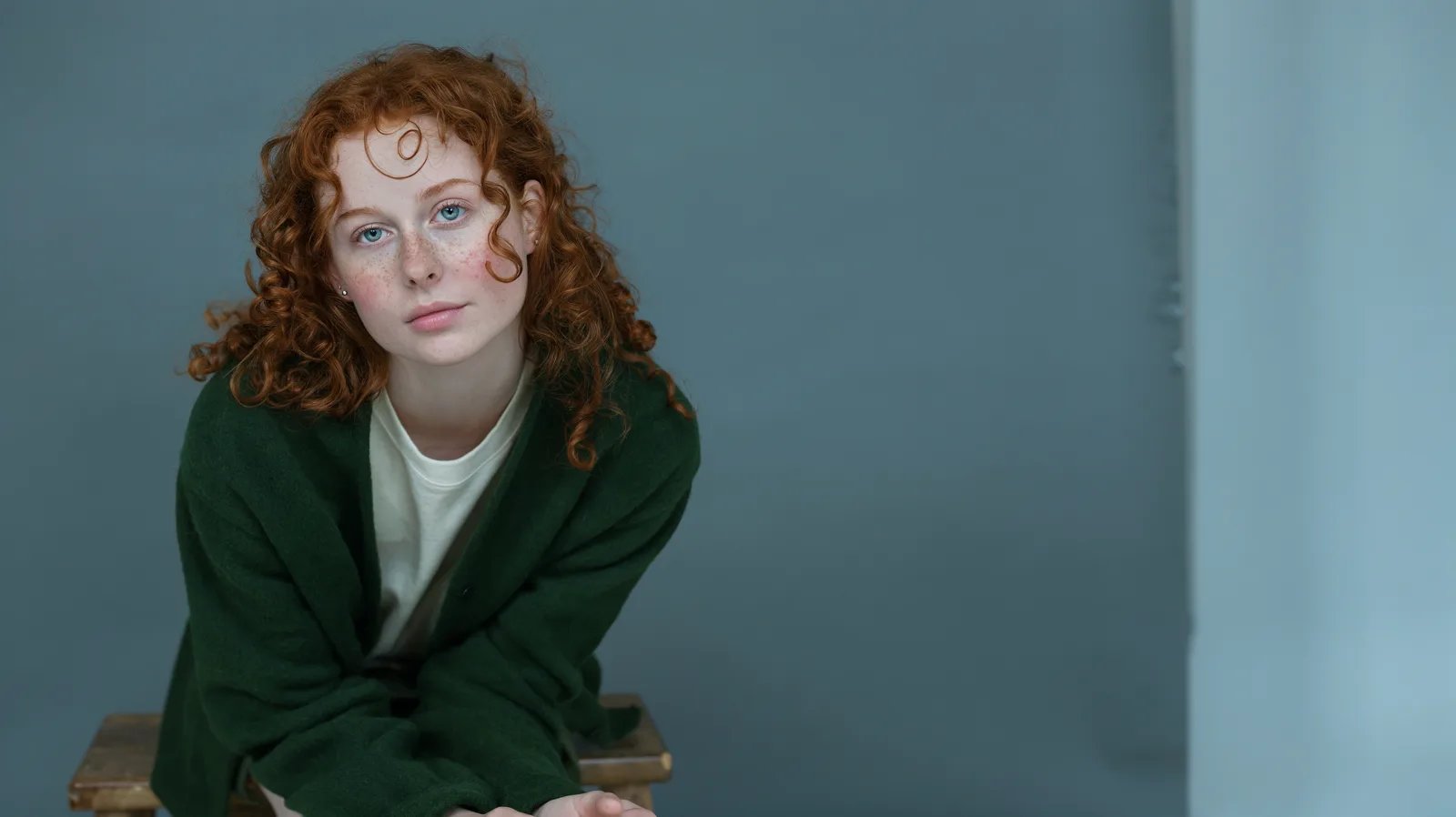
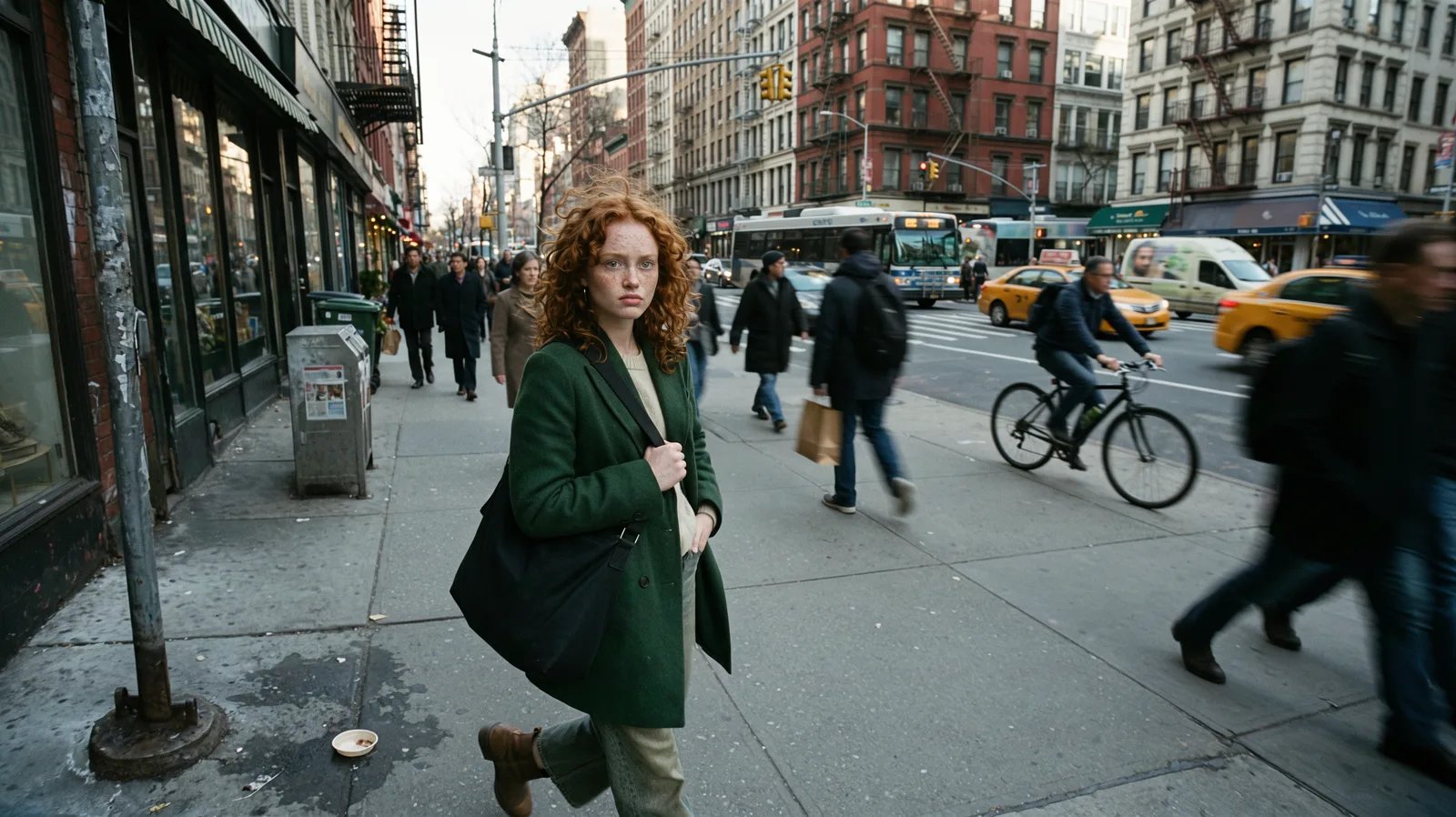
Here is the same idea expanded gradually. Each image was generated with FLUX 3 Image from the prompt above it:

<Steps>
  <Step title="Start with image type and subject">
    `portrait, a young woman with curly red hair`

    <Frame>
      <img src="https://mintcdn.com/bfl/2M9j52sP07XkdzRL/images/flux3-image/regen/build-step1.webp?fit=max&auto=format&n=2M9j52sP07XkdzRL&q=85&s=663b5ee13027dac6ce06dabed86e84c2" alt="Portrait of a young woman with curly red hair" width="1600" height="898" data-path="images/flux3-image/regen/build-step1.webp" />
    </Frame>
  </Step>

  <Step title="Add the location">
    `portrait, a young woman with curly red hair, in a bustling city street`

    <Frame>
      <img src="https://mintcdn.com/bfl/2M9j52sP07XkdzRL/images/flux3-image/regen/build-step2.webp?fit=max&auto=format&n=2M9j52sP07XkdzRL&q=85&s=5984c2f56498eca33ce050a2d560ede4" alt="Young woman with curly red hair in a city street" width="1600" height="898" data-path="images/flux3-image/regen/build-step2.webp" />
    </Frame>
  </Step>

  <Step title="Add the visual direction">
    `portrait, a young woman with curly red hair, in a bustling city street, fashion editorial photography, 85mm lens, soft golden hour light`

    <Frame>
      <img src="https://mintcdn.com/bfl/2M9j52sP07XkdzRL/images/flux3-image/regen/build-step3.webp?fit=max&auto=format&n=2M9j52sP07XkdzRL&q=85&s=fd1895490e24b6c90df1ba0dec4ba1a7" alt="Fashion editorial portrait with golden hour light" width="1600" height="898" data-path="images/flux3-image/regen/build-step3.webp" />
    </Frame>
  </Step>

  <Step title="Refine with color and detail">
    `portrait, a young woman with curly red hair, in a bustling city street, fashion editorial photography, 85mm lens, soft golden hour light, warm amber and charcoal tones, subtle film grain, wind-blown hair and blurred city lights`

    <Frame>
      <img src="https://mintcdn.com/bfl/2M9j52sP07XkdzRL/images/flux3-image/regen/build-step4.webp?fit=max&auto=format&n=2M9j52sP07XkdzRL&q=85&s=eea1f4f5456ba6e05ce4866b30ef8bef" alt="Final portrait with warm tones, film grain, and wind-blown hair" width="1600" height="898" data-path="images/flux3-image/regen/build-step4.webp" />
    </Frame>
  </Step>
</Steps>

For FLUX 3, you can write the finished list as sentences in the order from [Structure helps](#structure-helps). Use sentences to connect details such as where the light falls and what is in focus:

```text wrap theme={null}
A young woman with curly red hair stands on a bustling city street, her hair blown sideways by the wind. Behind her, the city lights blur into soft circles. Soft golden hour light falls on her face from the left. Portrait framing at eye level with an 85mm lens and a shallow depth of field. Fashion editorial photography in warm amber and charcoal tones, with subtle film grain.
```

## Practical advice

* Start with the subject and what it is doing.
* Add the setting, light, and framing next. Describe the light as something that happens in the scene.
* Name the style concretely: a medium, an era, a film stock.
* Use colors when you want stronger visual cohesion. In an edit, a hex code specifies a target color.
* Add effect and additional elements last. These are refinements, not the foundation.
* Write long when it helps: detailed captions can specify more of the scene. Remove any sentence that does not describe something visible.
* To specify element positions, add [bounding boxes](/flux_3/flux3_image_layout).

<Warning>
  Do not treat the component list like a checklist you must always fill out. Strong prompts are specific, not necessarily long.
</Warning>


This documentation is built and hosted on [Mintlify](https://mintlify.com), a developer documentation platform.